
Motion Profiling
Smooth, controlled autonomous movement with trapezoidal profiles
What is Motion Profiling?
Motion profiling is a technique that creates smooth, controlled movement by planning velocity and acceleration over time. Instead of instantly jumping to full speed, motion profiles gradually accelerate, maintain a constant velocity, then decelerate smoothly to the target position.
Think of it like driving a car: you don't instantly go from 0 to 60 mph - you gradually press the accelerator, cruise at highway speed, then brake smoothly before your destination.
Why Use Motion Profiling?
Problems Without Motion Profiling:
- Robot jerks violently when starting/stopping
- Wheels slip due to sudden acceleration
- Mechanisms break from impact forces
- Inconsistent autonomous movements
- Overshooting targets
Motion Profiling Benefits:
- Smooth, predictable movement
- Reduced mechanical stress
- Better traction (no wheel slip)
- Consistent autonomous performance
- Professional-looking robot behavior
- Accurate position control
Trapezoidal Motion Profile
The most common motion profile is the trapezoidal velocity profile, which has three distinct phases:
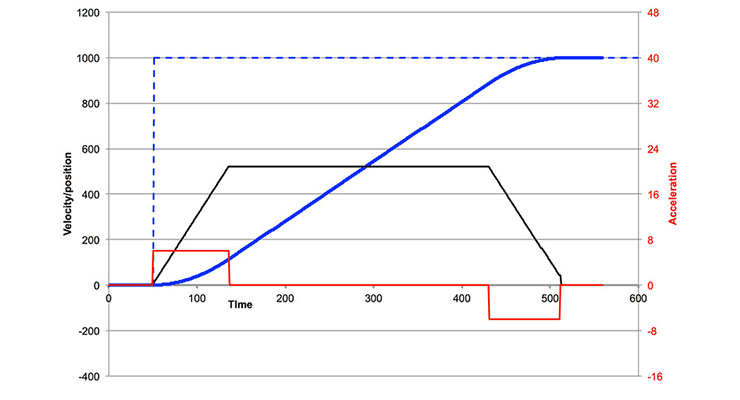
Three Phases
- Acceleration Phase: Robot accelerates from rest at constant acceleration until reaching max velocity
- Cruise Phase: Robot maintains constant max velocity
- Deceleration Phase: Robot decelerates at constant rate until stopping at target
The velocity vs. time graph forms a trapezoid shape - hence the name.
Why Trapezoidal?
- Simple to implement and understand
- Computationally efficient
- Smooth enough for most FTC applications
- Easy to tune (only 2 parameters)
- Predictable behavior
How It Works
Key Parameters
Max Velocity (v_max): The fastest speed the robot can travel during the cruise phase
Max Acceleration (a_max): How quickly the robot speeds up and slows down
Position, Velocity, and Acceleration
At any point in time, the motion profile calculates:
- Target Position: Where the robot should be
- Target Velocity: How fast it should be moving
- Target Acceleration: Whether speeding up, cruising, or slowing down
These targets are fed into a PID controller or feedforward controller to generate motor powers.
The Math
For a move distance with max velocity and max acceleration :
Time to accelerate to max velocity:
Distance covered during acceleration:
Cruise distance:
Total time:
If distance allows full trapezoid (d ≥ 2d_accel):
- Acceleration phase: 0 ≤ t < t_accel
- Cruise phase: t_accel ≤ t < t_total - t_accel
- Deceleration phase: t_total - t_accel ≤ t ≤ t_total
If distance too short (triangular profile, d < 2d_accel):
- No cruise phase
- Peak velocity: v_peak = √(d · a_max)
- Accelerate to peak velocity < v_max
- Immediately decelerate
Kinematic Equations for Each Phase
Acceleration Phase (0 ≤ t < t_accel):
Cruise Phase (t_accel ≤ t < t_total - t_accel):
Deceleration Phase (t_total - t_accel ≤ t ≤ t_total):
Let t_d = t - (t_total - t_accel)
Basic Implementation
Simple Motion Profile Class
public class TrapezoidalProfile {
    private double maxVelocity;
    private double maxAcceleration;
    private double startPosition;
    private double targetPosition;
    private double startTime;

    public TrapezoidalProfile(double maxVel, double maxAccel) {
        this.maxVelocity = maxVel;
        this.maxAcceleration = maxAccel;
    }

    public void setTarget(double current, double target) {
        this.startPosition = current;
        this.targetPosition = target;
        this.startTime = System.nanoTime() / 1e9;
    }

    public State calculate(double currentTime) {
        double dt = currentTime - startTime;
        double distance = Math.abs(targetPosition - startPosition);
        int direction = (targetPosition > startPosition) ? 1 : -1;

        // Time to reach max velocity
        double accelTime = maxVelocity / maxAcceleration;

        // Distance covered during acceleration
        double accelDist = 0.5 * maxAcceleration * accelTime * accelTime;

        // Check if we can reach max velocity
        double cruiseDist = distance - 2 * accelDist;

        if (cruiseDist < 0) {
            // Triangular profile - can't reach max velocity
            double peakVel = Math.sqrt(distance * maxAcceleration);
            accelTime = peakVel / maxAcceleration;
            accelDist = distance / 2;
            cruiseDist = 0;
        }

        double cruiseTime = cruiseDist / maxVelocity;
        double decelTime = accelTime;
        double totalTime = accelTime + cruiseTime + decelTime;

        double position, velocity;

        if (dt < accelTime) {
            // Acceleration phase
            velocity = maxAcceleration * dt;
            position = 0.5 * maxAcceleration * dt * dt;
        } else if (dt < accelTime + cruiseTime) {
            // Cruise phase
            velocity = maxVelocity;
            double cruiseElapsed = dt - accelTime;
            position = accelDist + maxVelocity * cruiseElapsed;
        } else if (dt < totalTime) {
            // Deceleration phase
            double decelElapsed = dt - accelTime - cruiseTime;
            velocity = maxVelocity - maxAcceleration * decelElapsed;
            position = accelDist + cruiseDist +
                      maxVelocity * decelElapsed -
                      0.5 * maxAcceleration * decelElapsed * decelElapsed;
        } else {
            // Finished
            velocity = 0;
            position = distance;
        }

        return new State(
            startPosition + direction * position,
            direction * velocity
        );
    }

    public static class State {
        public double position;
        public double velocity;

        public State(double pos, double vel) {
            this.position = pos;
            this.velocity = vel;
        }
    }
}
class TrapezoidalProfile(
private val maxVelocity: Double,
private val maxAcceleration: Double
) {
private var startPosition = 0.0
private var targetPosition = 0.0
private var startTime = 0.0
fun setTarget(current: Double, target: Double) {
startPosition = current
targetPosition = target
startTime = System.nanoTime() / 1e9
}
fun calculate(currentTime: Double): State {
val dt = currentTime - startTime
val distance = abs(targetPosition - startPosition)
val direction = if (targetPosition > startPosition) 1 else -1
// Time to reach max velocity
var accelTime = maxVelocity / maxAcceleration
// Distance covered during acceleration
var accelDist = 0.5 * maxAcceleration * accelTime * accelTime
// Check if we can reach max velocity
var cruiseDist = distance - 2 * accelDist
if (cruiseDist < 0) {
// Triangular profile - can't reach max velocity
val peakVel = sqrt(distance * maxAcceleration)
accelTime = peakVel / maxAcceleration
accelDist = distance / 2
cruiseDist = 0.0
}
val cruiseTime = cruiseDist / maxVelocity
val decelTime = accelTime
val totalTime = accelTime + cruiseTime + decelTime
val (position, velocity) = when {
dt < accelTime -> {
// Acceleration phase
val vel = maxAcceleration * dt
val pos = 0.5 * maxAcceleration * dt * dt
Pair(pos, vel)
}
dt < accelTime + cruiseTime -> {
// Cruise phase
val cruiseElapsed = dt - accelTime
val pos = accelDist + maxVelocity * cruiseElapsed
Pair(pos, maxVelocity)
}
dt < totalTime -> {
// Deceleration phase
val decelElapsed = dt - accelTime - cruiseTime
val vel = maxVelocity - maxAcceleration * decelElapsed
val pos = accelDist + cruiseDist +
maxVelocity * decelElapsed -
0.5 * maxAcceleration * decelElapsed * decelElapsed
Pair(pos, vel)
}
else -> {
// Finished
Pair(distance, 0.0)
}
}
return State(
startPosition + direction * position,
direction * velocity
)
}
data class State(
val position: Double,
val velocity: Double
)
}Using Motion Profiles
Example: Profiled Autonomous Drive
@Autonomous(name = "Profiled Drive")
public class ProfiledDrive extends LinearOpMode {
    private TrapezoidalProfile profile;
    private PIDController controller;
    private DcMotor leftMotor, rightMotor;

    @Override
    public void runOpMode() {
        leftMotor = hardwareMap.get(DcMotor.class, "left");
        rightMotor = hardwareMap.get(DcMotor.class, "right");

        // Create motion profile
        // Max velocity: 2000 ticks/sec, Max acceleration: 1000 ticks/sec²
        profile = new TrapezoidalProfile(2000, 1000);

        // PID controller to follow the profile
        controller = new PIDController(0.001, 0.0, 0.0);

        waitForStart();

        // Move 4800 ticks forward (4 feet)
        int startPos = leftMotor.getCurrentPosition();
        int targetPos = startPos + 4800;

        profile.setTarget(startPos, targetPos);

        while (opModeIsActive()) {
            double currentTime = getRuntime();
            int currentPos = leftMotor.getCurrentPosition();

            // Get target state from profile
            TrapezoidalProfile.State target = profile.calculate(currentTime);

            // Use PID to follow the profile
            double power = controller.calculate(currentPos, target.position);

            leftMotor.setPower(power);
            rightMotor.setPower(power);

            // Stop when reached target
            if (Math.abs(currentPos - targetPos) < 10) {
                break;
            }

            telemetry.addData("Current", currentPos);
            telemetry.addData("Target Pos", target.position);
            telemetry.addData("Target Vel", target.velocity);
            telemetry.update();
        }

        leftMotor.setPower(0);
        rightMotor.setPower(0);
    }
}@Autonomous(name = "Profiled Drive")
class ProfiledDrive : LinearOpMode() {
private lateinit var profile: TrapezoidalProfile
private lateinit var controller: PIDController
private lateinit var leftMotor: DcMotor
private lateinit var rightMotor: DcMotor
override fun runOpMode() {
leftMotor = hardwareMap.get(DcMotor::class.java, "left")
rightMotor = hardwareMap.get(DcMotor::class.java, "right")
// Create motion profile
// Max velocity: 2000 ticks/sec, Max acceleration: 1000 ticks/sec²
profile = TrapezoidalProfile(2000.0, 1000.0)
// PID controller to follow the profile
controller = PIDController(0.001, 0.0, 0.0)
waitForStart()
// Move 4800 ticks forward (4 feet)
val startPos = leftMotor.currentPosition.toDouble()
val targetPos = startPos + 4800
profile.setTarget(startPos, targetPos)
while (opModeIsActive()) {
val currentTime = runtime
val currentPos = leftMotor.currentPosition.toDouble()
// Get target state from profile
val target = profile.calculate(currentTime)
// Use PID to follow the profile
val power = controller.calculate(currentPos, target.position)
leftMotor.power = power
rightMotor.power = power
// Stop when reached target
if (abs(currentPos - targetPos) < 10) {
break
}
telemetry.addData("Current", currentPos)
telemetry.addData("Target Pos", target.position)
telemetry.addData("Target Vel", target.velocity)
telemetry.update()
}
leftMotor.power = 0.0
rightMotor.power = 0.0
}
}Using with FTC SDK
Integrate motion profiling with standard FTC SDK control loops:
@TeleOp(name = "Profiled Arm Control")
public class ProfiledArmControl extends LinearOpMode {
    private TrapezoidalProfile profile;
    private PIDController pidController;
    private DcMotorEx armMotor;
    private ElapsedTime timer;

    // Arm positions
    private static final int REST = 0;
    private static final int INTAKE = 200;
    private static final int SCORE = 1500;

    @Override
    public void runOpMode() {
        armMotor = hardwareMap.get(DcMotorEx.class, "arm");
        armMotor.setMode(DcMotor.RunMode.STOP_AND_RESET_ENCODER);
        armMotor.setMode(DcMotor.RunMode.RUN_WITHOUT_ENCODER);

        // Create profile and PID controller
        profile = new TrapezoidalProfile(1000.0, 500.0);
        pidController = new PIDController(0.002, 0.0, 0.0);
        timer = new ElapsedTime();

        waitForStart();

        // Start at rest position
        profile.setTarget(0, REST);
        timer.reset();

        while (opModeIsActive()) {
            // Button controls
            if (gamepad1.a) {
                int current = armMotor.getCurrentPosition();
                profile.setTarget(current, INTAKE);
                timer.reset();
            } else if (gamepad1.y) {
                int current = armMotor.getCurrentPosition();
                profile.setTarget(current, SCORE);
                timer.reset();
            } else if (gamepad1.b) {
                int current = armMotor.getCurrentPosition();
                profile.setTarget(current, REST);
                timer.reset();
            }

            // Calculate profiled target
            TrapezoidalProfile.State target = profile.calculate(timer.seconds());

            // Use PID to follow the profile
            int currentPos = armMotor.getCurrentPosition();
            double power = pidController.calculate(currentPos, target.position);

            armMotor.setPower(power);

            telemetry.addData("Current", currentPos);
            telemetry.addData("Target Pos", target.position);
            telemetry.addData("Target Vel", target.velocity);
            telemetry.update();
        }
    }
}@TeleOp(name = "Profiled Arm Control")
class ProfiledArmControl : LinearOpMode() {
private lateinit var profile: TrapezoidalProfile
private lateinit var pidController: PIDController
private lateinit var armMotor: DcMotorEx
private lateinit var timer: ElapsedTime
// Arm positions
companion object {
const val REST = 0
const val INTAKE = 200
const val SCORE = 1500
}
override fun runOpMode() {
armMotor = hardwareMap.get(DcMotorEx::class.java, "arm")
armMotor.mode = DcMotor.RunMode.STOP_AND_RESET_ENCODER
armMotor.mode = DcMotor.RunMode.RUN_WITHOUT_ENCODER
// Create profile and PID controller
profile = TrapezoidalProfile(1000.0, 500.0)
pidController = PIDController(0.002, 0.0, 0.0)
timer = ElapsedTime()
waitForStart()
// Start at rest position
profile.setTarget(0.0, REST.toDouble())
timer.reset()
while (opModeIsActive()) {
// Button controls
when {
gamepad1.a -> {
val current = armMotor.currentPosition.toDouble()
profile.setTarget(current, INTAKE.toDouble())
timer.reset()
}
gamepad1.y -> {
val current = armMotor.currentPosition.toDouble()
profile.setTarget(current, SCORE.toDouble())
timer.reset()
}
gamepad1.b -> {
val current = armMotor.currentPosition.toDouble()
profile.setTarget(current, REST.toDouble())
timer.reset()
}
}
// Calculate profiled target
val target = profile.calculate(timer.seconds())
// Use PID to follow the profile
val currentPos = armMotor.currentPosition.toDouble()
val power = pidController.calculate(currentPos, target.position)
armMotor.power = power
telemetry.addData("Current", currentPos)
telemetry.addData("Target Pos", target.position)
telemetry.addData("Target Vel", target.velocity)
telemetry.update()
}
}
}This approach combines the motion profile from earlier with PID control for smooth, predictable arm movement.
Tuning Parameters
Max Velocity
Start with your robot's actual maximum speed:
// Find max velocity experimentally
@TeleOp(name = "Find Max Velocity")
public class FindMaxVelocity extends LinearOpMode {
    @Override
    public void runOpMode() {
        DcMotorEx motor = hardwareMap.get(DcMotorEx.class, "motor");

        waitForStart();

        motor.setPower(1.0);
        sleep(2000);  // Let it stabilize

        double maxVel = motor.getVelocity();

        telemetry.addData("Max Velocity", maxVel);
        telemetry.update();

        while (opModeIsActive()) {
            // Keep displaying
        }
    }
}
// Find max velocity experimentally
@TeleOp(name = "Find Max Velocity")
class FindMaxVelocity : LinearOpMode() {
override fun runOpMode() {
val motor = hardwareMap.get(DcMotorEx::class.java, "motor")
waitForStart()
motor.power = 1.0
sleep(2000) // Let it stabilize
val maxVel = motor.velocity
telemetry.addData("Max Velocity", maxVel)
telemetry.update()
while (opModeIsActive()) {
// Keep displaying
}
}
}Use 70-80% of measured max velocity for your profile to leave headroom.
Max Acceleration
Start conservative and increase:
| Value | Effect |
|---|---|
| Too Low | Slow, takes forever to reach target |
| Good | Smooth, no wheel slip, consistent |
| Too High | Wheels slip, jerky, overshoots |
Starting point: Use maxAcceleration = maxVelocity / 2
Tuning process:
- Test the profile
- If smooth but slow → increase acceleration
- If wheels slip → decrease acceleration
- If overshoots → decrease acceleration or tune PID
Real-World Applications
1. Profiled Elevator
public class ProfiledElevator {
    private TrapezoidalProfile profile;
    private PIDController pid;
    private DcMotorEx elevator;

    // Elevator positions (in ticks)
    private static final int GROUND = 0;
    private static final int LOW = 500;
    private static final int MID = 1000;
    private static final int HIGH = 1500;

    public ProfiledElevator(HardwareMap hardwareMap) {
        elevator = hardwareMap.get(DcMotorEx.class, "elevator");
        profile = new TrapezoidalProfile(800, 400);  // Conservative speeds
        pid = new PIDController(0.002, 0.0, 0.0);
    }

    public void goToHeight(int targetHeight) {
        int current = elevator.getCurrentPosition();
        profile.setTarget(current, targetHeight);
    }

    public void update() {
        double time = System.nanoTime() / 1e9;
        int current = elevator.getCurrentPosition();

        TrapezoidalProfile.State target = profile.calculate(time);
        double power = pid.calculate(current, target.position);

        elevator.setPower(power);
    }
}
class ProfiledElevator(hardwareMap: HardwareMap) {
private val elevator: DcMotorEx = hardwareMap.get(DcMotorEx::class.java, "elevator")
private val profile = TrapezoidalProfile(800.0, 400.0) // Conservative speeds
private val pid = PIDController(0.002, 0.0, 0.0)
// Elevator positions (in ticks)
companion object {
const val GROUND = 0
const val LOW = 500
const val MID = 1000
const val HIGH = 1500
}
fun goToHeight(targetHeight: Int) {
val current = elevator.currentPosition.toDouble()
profile.setTarget(current, targetHeight.toDouble())
}
fun update() {
val time = System.nanoTime() / 1e9
val current = elevator.currentPosition.toDouble()
val target = profile.calculate(time)
val power = pid.calculate(current, target.position)
elevator.power = power
}
}2. Profiled Autonomous Sequence
@Autonomous(name = "Profiled Auto")
public class ProfiledAuto extends LinearOpMode {

    private void driveToPosition(int target) {
        TrapezoidalProfile profile = new TrapezoidalProfile(2000, 1000);
        PIDController pid = new PIDController(0.001, 0.0, 0.0);

        int start = leftMotor.getCurrentPosition();
        profile.setTarget(start, target);

        ElapsedTime timer = new ElapsedTime();

        while (opModeIsActive()) {
            int current = leftMotor.getCurrentPosition();
            TrapezoidalProfile.State state = profile.calculate(timer.seconds());

            double power = pid.calculate(current, state.position);
            drive.setPower(power);

            if (Math.abs(current - target) < 10) break;
        }

        drive.setPower(0);
    }

    @Override
    public void runOpMode() {
        // Initialize hardware

        waitForStart();

        // Smooth autonomous sequence
        driveToPosition(2400);  // Drive 2 feet forward
        sleep(500);

        driveToPosition(0);     // Return to start
        sleep(500);

        driveToPosition(-1200); // Back up 1 foot
    }
}@Autonomous(name = "Profiled Auto")
class ProfiledAuto : LinearOpMode() {
private fun driveToPosition(target: Int) {
val profile = TrapezoidalProfile(2000.0, 1000.0)
val pid = PIDController(0.001, 0.0, 0.0)
val start = leftMotor.currentPosition.toDouble()
profile.setTarget(start, target.toDouble())
val timer = ElapsedTime()
while (opModeIsActive()) {
val current = leftMotor.currentPosition.toDouble()
val state = profile.calculate(timer.seconds())
val power = pid.calculate(current, state.position)
drive.power = power
if (abs(current - target) < 10) break
}
drive.power = 0.0
}
override fun runOpMode() {
// Initialize hardware
waitForStart()
// Smooth autonomous sequence
driveToPosition(2400) // Drive 2 feet forward
sleep(500)
driveToPosition(0) // Return to start
sleep(500)
driveToPosition(-1200) // Back up 1 foot
}
}Advanced: Feedforward with Profiles
Combine motion profiles with feedforward control for even better tracking:
// Calculate feedforward term
double kV = 0.0005;  // Velocity feedforward constant
double kA = 0.0001;  // Acceleration feedforward constant

TrapezoidalProfile.State target = profile.calculate(time);

// Feedforward helps predict needed power
double feedforward = kV * target.velocity + kA * target.acceleration;

// PID corrects any errors
double pidOutput = pid.calculate(currentPosition, target.position);

// Combine both
double totalPower = feedforward + pidOutput;
motor.setPower(totalPower);
// Calculate feedforward term
val kV = 0.0005 // Velocity feedforward constant
val kA = 0.0001 // Acceleration feedforward constant
val target = profile.calculate(time)
// Feedforward helps predict needed power
val feedforward = kV * target.velocity + kA * target.acceleration
// PID corrects any errors
val pidOutput = pid.calculate(currentPosition, target.position)
// Combine both
val totalPower = feedforward + pidOutput
motor.power = totalPowerTroubleshooting
Profile Too Slow
- Increase max velocity (but stay under 80% of hardware limit)
- Check if using triangular profile (distance too short for full trapezoid)
- Verify motors aren't hitting power limits
Overshoots Target
- Decrease max acceleration
- Tune PID controller (reduce P gain)
- Add deceleration margin (stop profile slightly before target)
Jerky Movement
- Max acceleration too high
- PID D term causing oscillation
- Motor deadband issues (add small offset)
Wheels Slipping
- Max acceleration too aggressive for traction
- Robot too heavy for current acceleration
- Floor surface too slippery
Motion Profiling vs Path Following
| Feature | Motion Profiling | Path Following |
|---|---|---|
| What it controls | Position along straight line | Position in 2D space |
| Complexity | Simple | Complex |
| Use Case | Elevators, arms, straight drives | Curved autonomous paths |
| Libraries | DIY implementation | Pedro Pathing, Road Runner |
Motion profiling is often used within path following systems to control individual motor movements.
Tips for Success
- Test at Low Speed First: Start with low max velocity, verify it works
- Measure Real Values: Don't guess max velocity - measure it
- Log Everything: Graph position, velocity, target vs. actual
- Account for Units: Ticks, inches, or degrees? Be consistent
- Add Safety Limits: Check position bounds, velocity sanity
- Consider Momentum: Heavy mechanisms need gentler acceleration
Resources
- CTRL ALT FTC: Control Theory Guide
- WPILib: Trajectory Generation
- Game Manual 0: Motion Planning
Next Steps
- Implement basic trapezoidal profile class
- Test with simple straight-line drive
- Measure your robot's max velocity
- Tune max acceleration for smooth movement
- Apply to elevator/arm mechanisms
- Combine with PID for precise control
- Explore advanced path following libraries
Pro Tip: Motion profiling transforms jerky, inconsistent autonomous into smooth, professional movement. It's worth the initial setup time!