
Pure Pursuit
Follow smooth curved paths with a lookahead point algorithm
What is Pure Pursuit?
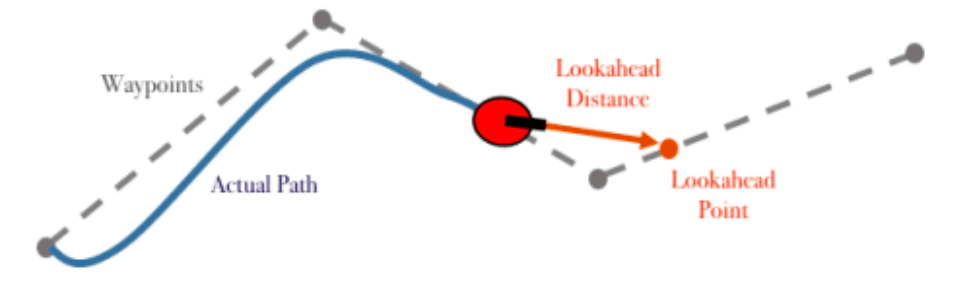
Pure Pursuit is a path following algorithm that allows your robot to smoothly follow curved paths by continuously "chasing" a lookahead point ahead of it on the path.
Instead of going from waypoint to waypoint with sharp turns, Pure Pursuit creates smooth, continuous movement that looks professional and maintains speed through curves.
The Core Idea
Imagine driving a car while looking at a point 20 feet ahead on the road. You naturally steer toward that point, creating smooth turns. Pure Pursuit works the same way:
- Find a lookahead point some distance ahead on the path
- Calculate the curvature needed to reach that point
- Steer the robot along that arc
- Repeat continuously as robot moves
Why Pure Pursuit?
Without Pure Pursuit:
- Robot stops at each waypoint
- Sharp, jerky turns
- Slow autonomous times
- Inefficient movement
With Pure Pursuit:
- Smooth, continuous curves
- No stopping between waypoints
- Faster cycle times
- Professional appearance
How Pure Pursuit Works
1. Define a Path
Create a series of points the robot should pass through:
List<Point> path = Arrays.asList(
    new Point(0, 0),
    new Point(24, 12),
    new Point(48, 24),
    new Point(60, 36)
);
2. Find Lookahead Point
At each update, find the point on the path that's exactly lookahead distance away from the robot:
public Point findLookaheadPoint(List<Point> path, Point robotPos, double lookahead) {
    Point closestPoint = null;
    double closestDistance = Double.MAX_VALUE;

    // Check each segment of the path
    for (int i = 0; i < path.size() - 1; i++) {
        Point start = path.get(i);
        Point end = path.get(i + 1);

        // Find intersection of lookahead circle with line segment
        Point intersection = lineCircleIntersection(start, end, robotPos, lookahead);

        if (intersection != null) {
            double dist = distance(robotPos, intersection);
            if (dist < closestDistance) {
                closestDistance = dist;
                closestPoint = intersection;
            }
        }
    }

    return closestPoint != null ? closestPoint : path.get(path.size() - 1);
}
fun findLookaheadPoint(path: List<Point>, robotPos: Point, lookahead: Double): Point {
var closestPoint: Point? = null
var closestDistance = Double.MAX_VALUE
// Check each segment of the path
for (i in 0 until path.size - 1) {
val start = path[i]
val end = path[i + 1]
// Find intersection of lookahead circle with line segment
val intersection = lineCircleIntersection(start, end, robotPos, lookahead)
intersection?.let {
val dist = robotPos.distanceTo(it)
if (dist < closestDistance) {
closestDistance = dist
closestPoint = it
}
}
}
return closestPoint ?: path.last()
}3. Calculate Curvature
Determine how sharply the robot needs to turn to reach the lookahead point:
public double calculateCurvature(Point robot, Point lookahead, double heading) {
    // Transform lookahead to robot-relative coordinates
    double dx = lookahead.x - robot.x;
    double dy = lookahead.y - robot.y;

    // Rotate to robot frame
    double localX = dx * Math.cos(-heading) - dy * Math.sin(-heading);
    double localY = dx * Math.sin(-heading) + dy * Math.cos(-heading);

    // Calculate curvature (1/radius)
    double lookaheadDist = Math.hypot(localX, localY);
    return (2 * localY) / (lookaheadDist * lookaheadDist);
}
fun calculateCurvature(robot: Point, lookahead: Point, heading: Double): Double {
// Transform lookahead to robot-relative coordinates
val dx = lookahead.x - robot.x
val dy = lookahead.y - robot.y
// Rotate to robot frame
val localX = dx * cos(-heading) - dy * sin(-heading)
val localY = dx * sin(-heading) + dy * cos(-heading)
// Calculate curvature (1/radius)
val lookaheadDist = hypot(localX, localY)
return (2 * localY) / (lookaheadDist * lookaheadDist)
}4. Apply to Drivetrain
Convert curvature to motor powers:
public void followPath(List<Point> path, Odometry odom) {
    double LOOKAHEAD_DISTANCE = 12.0; // inches
    double BASE_SPEED = 0.6;

    while (opModeIsActive()) {
        odom.update();

        Point robotPos = new Point(odom.getX(), odom.getY());
        Point lookahead = findLookaheadPoint(path, robotPos, LOOKAHEAD_DISTANCE);

        if (lookahead == null) break; // Reached end

        double curvature = calculateCurvature(robotPos, lookahead, odom.getHeading());

        // Differential drive: adjust left/right speeds based on curvature
        double leftPower = BASE_SPEED * (1 - curvature * TRACK_WIDTH / 2);
        double rightPower = BASE_SPEED * (1 + curvature * TRACK_WIDTH / 2);

        leftMotor.setPower(leftPower);
        rightMotor.setPower(rightPower);
    }
}
fun followPath(path: List<Point>, odom: Odometry) {
val LOOKAHEAD_DISTANCE = 12.0 // inches
val BASE_SPEED = 0.6
while (opModeIsActive()) {
odom.update()
val robotPos = Point(odom.x, odom.y)
val lookahead = findLookaheadPoint(path, robotPos, LOOKAHEAD_DISTANCE) ?: break
val curvature = calculateCurvature(robotPos, lookahead, odom.heading)
// Differential drive: adjust left/right speeds based on curvature
val leftPower = BASE_SPEED * (1 - curvature * TRACK_WIDTH / 2)
val rightPower = BASE_SPEED * (1 + curvature * TRACK_WIDTH / 2)
leftMotor.power = leftPower
rightMotor.power = rightPower
}
}Tuning Parameters
Lookahead Distance
The lookahead distance is how far ahead the robot "looks" on the path.
-
Small lookahead (6-10 inches):
- Tighter path following
- Good for sharp corners
- Can oscillate or overshoot
-
Large lookahead (15-20 inches):
- Smoother movement
- Less oscillation
- Cuts corners on sharp turns
Recommended: Start with 12 inches and adjust based on your robot's performance.
Base Speed
Controls how fast the robot follows the path.
- Too fast: Robot overshoots, unstable
- Too slow: Wastes autonomous time
- Sweet spot: 60-80% power for most robots
Adaptive Lookahead
Advanced teams use variable lookahead based on speed or curvature:
double adaptiveLookahead = MIN_LOOKAHEAD + (robotSpeed / MAX_SPEED) * LOOKAHEAD_RANGE;Faster robot = longer lookahead (smoother)
Slower robot = shorter lookahead (tighter following)
Complete Pure Pursuit Example
@Autonomous(name = "Pure Pursuit Demo")
public class PurePursuitDemo extends LinearOpMode {

    private static final double LOOKAHEAD = 12.0;
    private static final double BASE_SPEED = 0.6;
    private static final double TRACK_WIDTH = 14.0;

    @Override
    public void runOpMode() {
        // Initialize odometry
        ThreeWheelOdometry odometry = new ThreeWheelOdometry(
            hardwareMap.get(DcMotor.class, "left_encoder"),
            hardwareMap.get(DcMotor.class, "right_encoder"),
            hardwareMap.get(DcMotor.class, "strafe_encoder")
        );

        DcMotor leftMotor = hardwareMap.get(DcMotor.class, "left_motor");
        DcMotor rightMotor = hardwareMap.get(DcMotor.class, "right_motor");

        // Define path
        List<Point> path = Arrays.asList(
            new Point(0, 0),
            new Point(24, 12),
            new Point(48, 24),
            new Point(60, 36)
        );

        waitForStart();

        while (opModeIsActive()) {
            odometry.update();

            Point robotPos = new Point(odometry.getX(), odometry.getY());
            Point lookahead = findLookaheadPoint(path, robotPos, LOOKAHEAD);

            // Check if finished
            if (robotPos.distanceTo(path.get(path.size() - 1)) < 3.0) {
                leftMotor.setPower(0);
                rightMotor.setPower(0);
                break;
            }

            // Calculate steering
            double curvature = calculateCurvature(robotPos, lookahead, odometry.getHeading());

            double leftPower = BASE_SPEED * (1 - curvature * TRACK_WIDTH / 2);
            double rightPower = BASE_SPEED * (1 + curvature * TRACK_WIDTH / 2);

            leftMotor.setPower(leftPower);
            rightMotor.setPower(rightPower);

            // Telemetry
            telemetry.addData("Position", "%.1f, %.1f", odometry.getX(), odometry.getY());
            telemetry.addData("Lookahead", "%.1f, %.1f", lookahead.x, lookahead.y);
            telemetry.addData("Curvature", curvature);
            telemetry.update();
        }
    }

    // Helper methods (findLookaheadPoint, calculateCurvature, etc.)
}@Autonomous(name = "Pure Pursuit Demo")
class PurePursuitDemo : LinearOpMode() {
companion object {
const val LOOKAHEAD = 12.0
const val BASE_SPEED = 0.6
const val TRACK_WIDTH = 14.0
}
override fun runOpMode() {
// Initialize odometry
val odometry = ThreeWheelOdometry(
hardwareMap.get(DcMotor::class.java, "left_encoder"),
hardwareMap.get(DcMotor::class.java, "right_encoder"),
hardwareMap.get(DcMotor::class.java, "strafe_encoder")
)
val leftMotor = hardwareMap.get(DcMotor::class.java, "left_motor")
val rightMotor = hardwareMap.get(DcMotor::class.java, "right_motor")
// Define path
val path = listOf(
Point(0.0, 0.0),
Point(24.0, 12.0),
Point(48.0, 24.0),
Point(60.0, 36.0)
)
waitForStart()
while (opModeIsActive()) {
odometry.update()
val robotPos = Point(odometry.x, odometry.y)
val lookahead = findLookaheadPoint(path, robotPos, LOOKAHEAD)
// Check if finished
if (robotPos.distanceTo(path.last()) < 3.0) {
leftMotor.power = 0.0
rightMotor.power = 0.0
break
}
// Calculate steering
val curvature = calculateCurvature(robotPos, lookahead, odometry.heading)
val leftPower = BASE_SPEED * (1 - curvature * TRACK_WIDTH / 2)
val rightPower = BASE_SPEED * (1 + curvature * TRACK_WIDTH / 2)
leftMotor.power = leftPower
rightMotor.power = rightPower
// Telemetry
telemetry.addData("Position", "%.1f, %.1f", odometry.x, odometry.y)
telemetry.addData("Lookahead", "%.1f, %.1f", lookahead.x, lookahead.y)
telemetry.addData("Curvature", curvature)
telemetry.update()
}
}
// Helper methods (findLookaheadPoint, calculateCurvature, etc.)
}Advantages Over Other Methods
| Method | Smoothness | Speed | Complexity | Stopping Points |
|---|---|---|---|---|
| Waypoints | ⭐⭐ | ⭐⭐ | ⭐ | Many |
| Pure Pursuit | ⭐⭐⭐⭐ | ⭐⭐⭐⭐ | ⭐⭐⭐ | None |
| Splines (Road Runner) | ⭐⭐⭐⭐⭐ | ⭐⭐⭐⭐⭐ | ⭐⭐⭐⭐⭐ | None |
Common Mistakes
Lookahead too small — Robot oscillates and overshoots
No end condition — Robot circles final point forever
Not updating odometry — Position estimates drift, path fails
Path points too far apart — Robot cuts corners excessively
Forgetting to clip motor powers — Values > 1.0 cause issues
Using Libraries Instead
While implementing Pure Pursuit from scratch is educational, production teams typically use libraries:
Pedro Pathing
- Built-in Pure Pursuit
- Bézier curve support
- Easy to use, well-documented
- Learn more: Pedro Pathing
Road Runner
- Advanced spline-based following
- More complex but very powerful
- Industry standard for top teams
- Learn more: Road Runner
Recommendation: Understand Pure Pursuit conceptually, then use Pedro Pathing or Road Runner for your actual autonomous. Don't reinvent the wheel!
Next Steps
Now that you understand Pure Pursuit, explore:
- Sensor Fusion — Combine odometry with vision for even better accuracy
- Pedro Pathing — Use a pre-built Pure Pursuit library
- Motion Profiling — Add velocity control to your paths