
Road Runner
Build a first Road Runner 1.0 action with the official FTC Quickstart
Road Runner is an motion-planning library. Its FTC Quickstart gives you a drive class, localization, tuning , and path builders for a specific . Start from the matching project instead of copying a Road Runner 0.5.x example: version 1.0 has an incompatible API.
Quickstart setup
Open the official Road Runner Quickstart in Android Studio, select its MecanumDrive or TankDrive, and complete the official tuning sequence. Tuning checks the 's scale, feedforward, and localization. A path can be valid code and still drive the wrong way if these values are wrong.
Starting pose
A pose stores a position and a heading. This practice route starts at (12, 12) facing 0 radians. Use the coordinate frame and units of the Quickstart drive class you installed; the numbers below are only for learning.
Pose2d start = new Pose2d(12, 12, 0);
MecanumDrive drive = new MecanumDrive(hardwareMap, start);
val start = Pose2d(12.0, 12.0, 0.0)
val drive = MecanumDrive(hardwareMap, start)These fragments use core/actions 1.0.1 and FTC bindings 0.1.25. The inspected Quickstart has its own SDK/dependency pins; do not assume that cloning it gives you an SDK 12 project. This example is for MecanumDrive; a tank drivetrain cannot execute the same strafe route.
imports are com.acmerobotics.roadrunner.Action, Pose2d, Vector2d, com.acmerobotics.roadrunner.ftc.Actions, and your project’s org.firstinspires.ftc.teamcode.MecanumDrive. Import the three core classes individually; a wildcard also imports Road Runner’s Math and can make Math.toRadians() ambiguous. Kotlin uses the same classes.
MecanumDrive comes from the Quickstart files. Its constructor configures your robot hardware and localizer; it is not a generic class supplied by Road Runner.
Route construction
The first segment moves to (36, 12). Then the robot turns 90 degrees and strafes to (36, 30). On these straight segments, strafeToConstantHeading changes position while keeping the current heading; after the turn, the robot is still facing 90 degrees during the final segment.
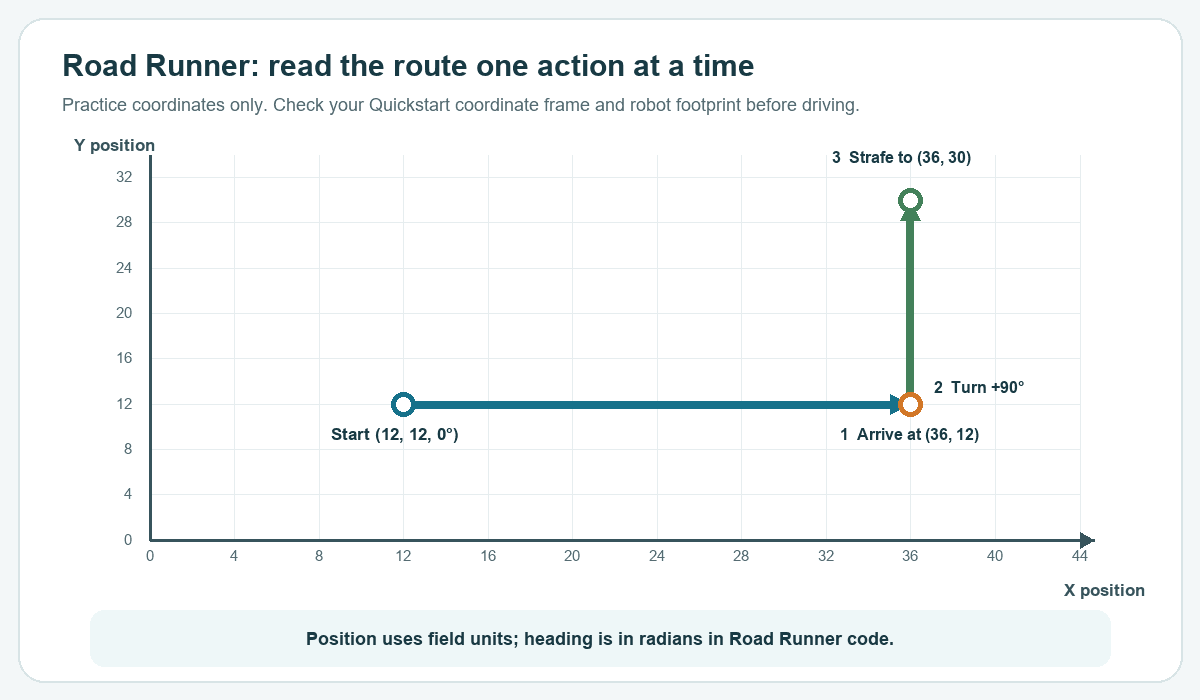
Start with just the first line, then add the turn, then add the final strafe. The completed builder looks like this:
Action route = drive.actionBuilder(start)
    .strafeToConstantHeading(new Vector2d(36, 12))
    .turn(Math.toRadians(90))
    .strafeToConstantHeading(new Vector2d(36, 30))
    .build();
val route: Action = drive.actionBuilder(start)
.strafeToConstantHeading(Vector2d(36.0, 12.0))
.turn(Math.toRadians(90.0))
.strafeToConstantHeading(Vector2d(36.0, 30.0))
.build()Each builder call adds the next movement. build() packages them as one Action; it does not start the robot moving yet.
Route execution
Before running the action, show a reminder in telemetry so you can check the physical starting position and the space around the robot. After Start, Actions.runBlocking keeps updating the action until it completes or the OpMode is stopped.
telemetry.addLine("Check the start pose and clear the route.");
telemetry.update();
waitForStart();
if (isStopRequested()) return;

Actions.runBlocking(route);telemetry.addLine("Check the start pose and clear the route.")
telemetry.update()
waitForStart()
if (isStopRequested) return
Actions.runBlocking(route)Run the robot on first to confirm the respond in the expected direction. Then try the short route at low speed in an empty area. Compare the reported endpoint with the real one, and correct localization or tuning errors before extending the path.
The coordinates are examples, not a route for a specific field. Check the current field, , robot footprint, and starting pose before using a route in a match.