
Field-centric mecanum drive
Rotate driver input into the robot frame and diagnose direction, heading, and drift problems
Field-centric drive keeps the sticks aligned with the field as the turns. It needs a heading measurement; it does not need X/Y just to drive this way.
First make forward, , and rotation work in robot-centric mode. Check names, directions, and the roller arrangement before adding the heading transform.
Choose the axes
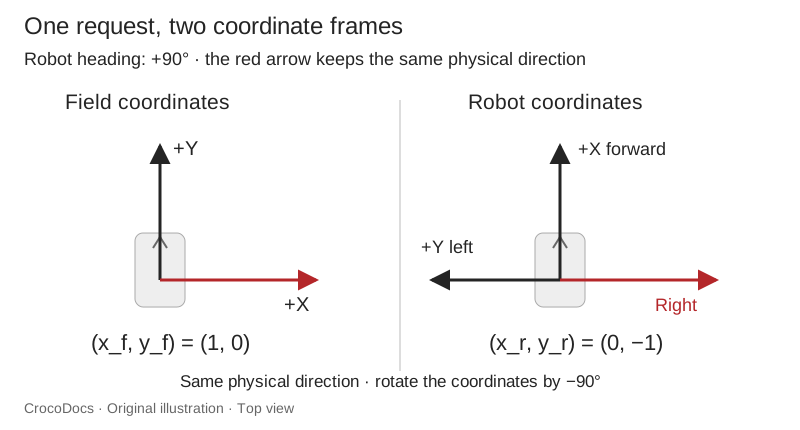
This example uses +X forward, +Y left, and counterclockwise-positive heading, viewed from above. Heading zero means the robot faces field +X. These are the example's axes: convert a library's pose if its convention differs.
Let be the requested field translation and the robot heading in radians. Rotate the request by the negative heading to express it in the robot frame:
When the robot faces field +Y, . A field-forward request becomes robot-right . The robot drives toward the same field direction even though its nose points left.
First drive test
Save this complete SDK 12 example as FieldCentricDrive.java. Configure four motors as frontLeft, frontRight, backLeft, and backRight, and the hub as imu. It assumes an X roller arrangement, the hub logo facing UP, and its USB ports facing FORWARD. Change those mounting directions to match the hub.
Verify each wheel's forward direction with the robot supported first. The left-side reversals below are an example for a mirrored , not a universal wiring setting. The 0.25 power limit is for the first floor test.
package org.firstinspires.ftc.teamcode;

import com.qualcomm.hardware.rev.RevHubOrientationOnRobot;
import com.qualcomm.robotcore.eventloop.opmode.LinearOpMode;
import com.qualcomm.robotcore.eventloop.opmode.TeleOp;
import com.qualcomm.robotcore.hardware.DcMotor;
import com.qualcomm.robotcore.hardware.IMU;
import org.firstinspires.ftc.robotcore.external.navigation.AngleUnit;

@TeleOp(name = "Field Centric Practice", group = "Practice")
public class FieldCentricDrive extends LinearOpMode {
    public static double[] wheelPowers(double fieldForward, double fieldLeft,
                                       double turnCCW, double headingRadians) {
        if (!Double.isFinite(fieldForward) || !Double.isFinite(fieldLeft)
                || !Double.isFinite(turnCCW) || !Double.isFinite(headingRadians)) {
            return new double[] {0, 0, 0, 0};
        }
        double c = Math.cos(headingRadians);
        double s = Math.sin(headingRadians);
        double forward = fieldForward * c + fieldLeft * s;
        double left = -fieldForward * s + fieldLeft * c;
        double denominator = Math.max(1.0,
                Math.abs(forward) + Math.abs(left) + Math.abs(turnCCW));
        return new double[] {
            (forward - left - turnCCW) / denominator,
            (forward + left + turnCCW) / denominator,
            (forward + left - turnCCW) / denominator,
            (forward - left + turnCCW) / denominator
        }; // front left, front right, back left, back right
    }

    @Override
    public void runOpMode() {
        DcMotor fl = hardwareMap.get(DcMotor.class, "frontLeft");
        DcMotor fr = hardwareMap.get(DcMotor.class, "frontRight");
        DcMotor bl = hardwareMap.get(DcMotor.class, "backLeft");
        DcMotor br = hardwareMap.get(DcMotor.class, "backRight");
        DcMotor[] motors = {fl, fr, bl, br};
        fl.setDirection(DcMotor.Direction.REVERSE);
        bl.setDirection(DcMotor.Direction.REVERSE);
        for (DcMotor motor : motors) {
            motor.setMode(DcMotor.RunMode.RUN_WITHOUT_ENCODER);
            motor.setZeroPowerBehavior(DcMotor.ZeroPowerBehavior.BRAKE);
        }
        IMU imu = hardwareMap.get(IMU.class, "imu");
        RevHubOrientationOnRobot mounting = new RevHubOrientationOnRobot(
                RevHubOrientationOnRobot.LogoFacingDirection.UP,
                RevHubOrientationOnRobot.UsbFacingDirection.FORWARD);
        if (!imu.initialize(new IMU.Parameters(mounting))) {
            telemetry.addLine("IMU initialization failed");
            telemetry.update();
            return;
        }
        telemetry.addLine("Face field +X before START. Practice power limit: 0.25.");
        telemetry.update();
        waitForStart();
        if (!opModeIsActive()) return;
        imu.resetYaw(); // This exercise deliberately starts at heading zero.
        try {
            while (opModeIsActive()) {
                double heading = imu.getRobotYawPitchRollAngles().getYaw(AngleUnit.RADIANS);
                double[] powers = wheelPowers(-gamepad1.left_stick_y,
                        -gamepad1.left_stick_x, -gamepad1.right_stick_x, heading);
                for (int i = 0; i < motors.length; i++) {
                    motors[i].setPower(0.25 * powers[i]);
                }
                telemetry.addData("Heading (deg)", "%.1f", Math.toDegrees(heading));
                telemetry.update();
                idle();
            }
        } finally {
            for (DcMotor motor : motors) motor.setPower(0);
        }
    }
}
The denominator scales all four requests together. Clipping each wheel independently changes the requested direction when translation and rotation are combined.
This example controls translation in the field frame and rotation from the right stick. It does not hold a heading when the turn stick is released; that would need a separate heading controller.
Direction checks
Test these cases at low power before increasing the limit:
| Check | Expected result | If it fails |
|---|---|---|
| Robot-centric forward, left, and counterclockwise turn | Each motion works independently | Fix wheel order, motor direction, or rollers first |
| Face field +X, push the left stick forward | Move along field +X | Check stick Y inversion and heading zero |
| Face field +Y, push the same stick forward | Strafe to the robot's right, still along field +X | Check radians and the transform's heading sign |
| Hold a field direction while turning slowly | Continue translating along that field direction | Check heading updates, mounting, and loop timing |
| Combine a diagonal and a turn | All wheel requests remain within the limit | Normalize together before applying the limit |
If robot-centric drive works but field-centric drive fails, inspect the heading path. Reversing random motors can hide one symptom while breaking the other motions. A small translation drift during turning can also come from wheel friction, load distribution, or an inaccurate heading; it does not establish that the transform is wrong.
Heading resets and library integration
The practice resets yaw because it requires a known starting orientation. For a match, preserve or deliberately establish the field heading when changing OpModes. Resetting yaw at an arbitrary angle rotates every driver command. Follow Auto to TeleOp handoff.
When Pedro or another drivetrain library owns the motors, use that library's manual-drive path and update lifecycle. Feeding its localizer heading into a second, independent motor writer creates conflicting owners. Keep the axis conversion at one boundary, and check the API for the library version actually installed.
For orientation and angle wrap, use IMU setup. For intermittent heading changes, work through localization troubleshooting.